−Juggling terminals and git diff.+Review what your agents changed.
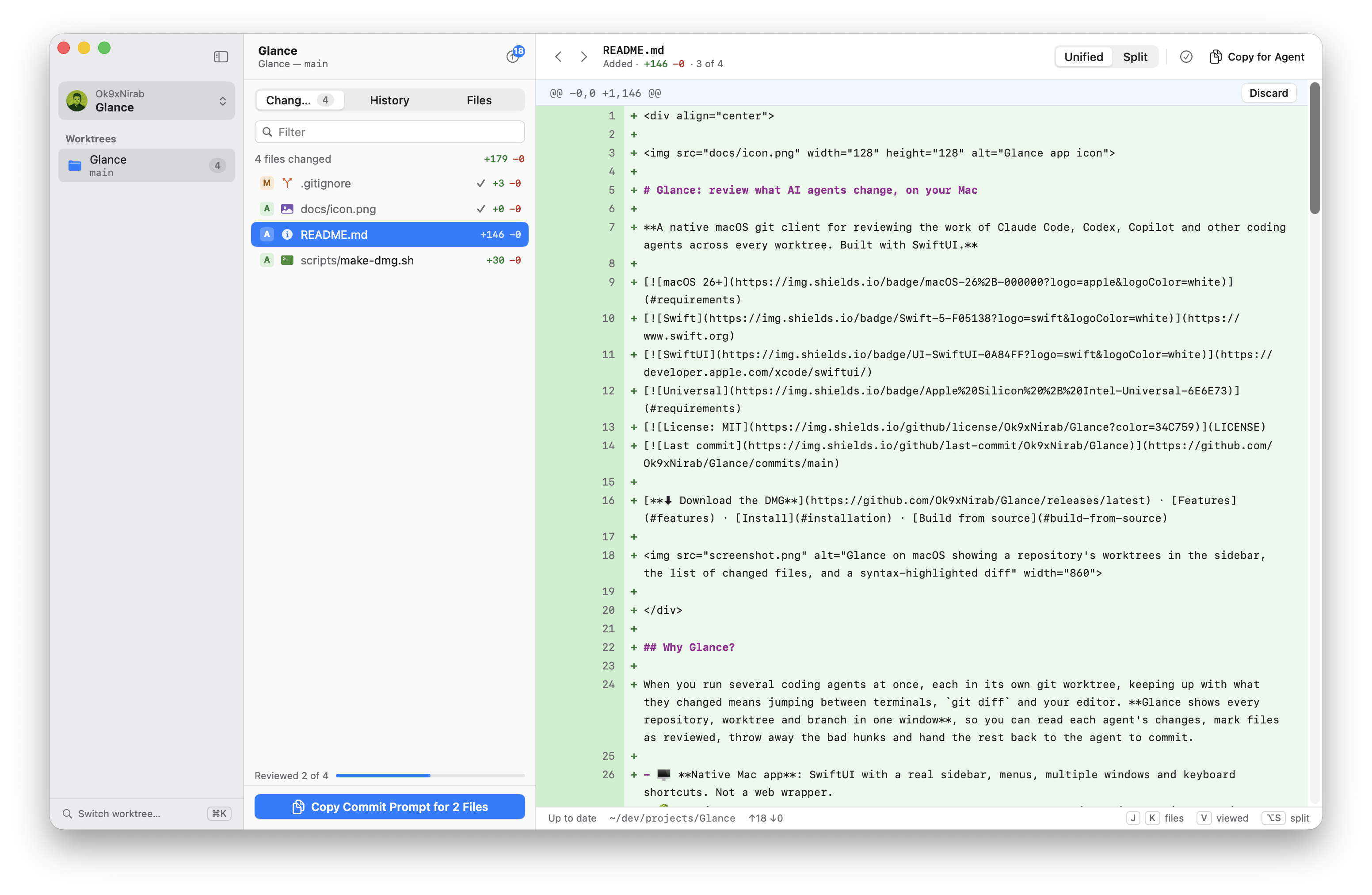
Glance is a native Mac app that shows every repository, worktree and branch in one window. Read each agent's diff as it writes, mark files as viewed, throw away the bad hunks, and hand the rest back to the agent to commit.
Run several coding agents at once, each in its own worktree. Glance keeps up with all of them, so you stop jumping between terminals, git diff and your editor.
1Agents work in worktrees
Every worktree, in the sidebar
Claude Code, Codex, Copilot or any other agent writes in its own git worktree. Glance finds each worktree and branch of the repository, and ⌘K jumps between them.
storefront-apimain
rate-limitagent/rate-limit7
checkout-testsagent/checkout-tests3
2You review in Glance
Read, mark, discard
Changes appear as the agent writes files. Step through them with JK, mark each one viewed with V, and discard a hunk or a whole file. ⌘Z brings it back.
@@ -8,3 +8,4 @@Discard
88app.use(express.json());
9−app.use(throttle(100));
9+app.use(rateLimit({ max: 100 }));
3The agent commits what you approved
Hand it back with one prompt
Glance doesn't commit. It copies a prompt that asks the agent to commit only the files you marked as viewed.
Commit only these files in /Users/you/dev/storefront-api, which I've reviewed:

- `src/middleware/rateLimit.ts`
- `src/server.ts`

Leave every other change uncommitted, and write a commit message that describes these changes.
Copy Commit Prompt for 2 Files
+Features
Three views, one job: knowing what changed.
Changes · ⌘1
The worktree's uncommitted changes, as a diff you can act on
Unified or split, syntax-highlighted, with hunk headers that stay pinned while you scroll. Discard a single hunk or several files at once (⌘/⇧-click), and push when the branch is ahead.
src/server.ts · @@ -6,4 +6,7 @@Unified · Split
66const app = express();
77app.use(express.json());
8−app.use(throttle(100));
8+app.use(rateLimit({
9+ windowMs: env.RATE_LIMIT_WINDOW_MS,
10+}));
911app.use('/checkout', checkoutRouter);
⌥S unified / splitJK next fileV viewed⌘Z undo a discard
History · ⌘2
Who wrote it, and what isn't pushed
The newest 500 commits. Glance names the agent from the Co-authored-by trailer and marks unpushed commits.
Add per-IP rate limitingClaude18 min4e1c9a2
Extract price helpersCodex41 minb7d03f5
origin/main
Retry webhooks with backoffYesterday2f4b8c1
⌘C copy SHA
Files · ⌘3
The whole tree, with change marks
Tabs, change badges and gutter marks for added and modified lines.
src
middleware
rateLimit.tsA
server.tsM
⌘P go to any file
Branches
Preview a branch before you switch
Click a branch in the sidebar to see its changes against the main branch and its history, read-only. Double-click to check it out.
feat/gift-cardspreview
release/2.4
Live
No refresh button
Glance watches each worktree with FSEvents and re-reads it when files, the index or HEAD change.
rateLimit.ts changed
Windows
One window per worktree
Open any worktree in its own window with ⌘N or from the sidebar. Glance reopens your windows where you left them.
Glance calls /usr/bin/git with your config, hooks and credentials. No account, no server, no tracking.
$ which git
/usr/bin/git
$ git config user.name
yours, as always
Hand-off
Copy for Agent
⇧⌘C copies the selected file's patch or commit, ready to paste into a prompt.
Syntax
Highlighted with tree-sitter
SwiftTypeScriptTSXJavaScriptJSONYAMLMarkdownShell
Plus light and dark mode, your system accent colour, and repository avatars from GitHub, GitLab, Bitbucket and Gitea/Forgejo.
−What Glance leaves alone
Agents stay in charge of git.
Glance reads and reviews. Committing, syncing and merging stay with your agents and your command line, where they already work. There's no staging area: the commit prompt, not the index, decides what gets committed.
glance/responsibilities−5 +3
−git commitYour agent commits the files you approved.
−git fetch · git pullSync from your agent or terminal.
−git mergeMerge conflicts are the agent's to resolve.
−git worktree addAgents and CLIs create worktrees and branches; Glance picks them up.
−git addNo staging. Mark files as viewed instead.
+read every changeAcross every repository, worktree and branch.
+discard what's wrongA hunk or a whole file, with undo.
+git pushWhen the branch is ahead, and you say so.
+Keyboard
Built to be driven from the keyboard.
Get around
⌘KSwitch worktree or branch
⌘TSwitch repository
⌘PGo to file
⌘1Changes, History, Files (⌘1–3)
Review
JKNext and previous file
VMark as viewed
⌥SUnified or split diff
⌘ZUndo a discard
Hand off
⇧⌘CCopy for Agent
⌘CCopy a commit's SHA
Windows
⌘NNew window
⌘OAdd a repository
⌃⌘SShow or hide the sidebar
+Install
Two minutes, one extra click.
Glance is free, so it isn't notarized by Apple (that needs a paid developer account). macOS will ask you to allow it the first time. The app isn't damaged, and every line of its source is on GitHub.
On macOS 15 and later, Control-click › Open no longer gets past this warning. Use Open Anyway.
macOS 26 (Tahoe) or laterApple Silicon or Intelgit from the Command Line Tools: xcode-select --install
+Open source
MIT licensed. Built with SwiftUI and tree-sitter.
Read the code, file a bug, or send a pull request. For bigger changes, open an issue first so we can talk it through. If Glance helps you, a star on GitHub helps other people find it.
 Glance